The questionnaire triggers an activate/de-activate update of the authorization objects which appear in both the 'authorization object-pane' and the 'authorization object field values-pane' of all queries available in the Queries Main Screen. In order to launch the automated update, simply click the 'binoculars'-button which can be found in the 'Select & Run' module or in the 'Audit Cockpit'.
It is important to understand that this functionality never pastes authorization objects from the 'Optional Authorization Object'-window into the 'Authorization Objects'- or 'Authorization Object Field Values'-pane.
It only activates or de-activates 'objects to be taken into account when running queries'.
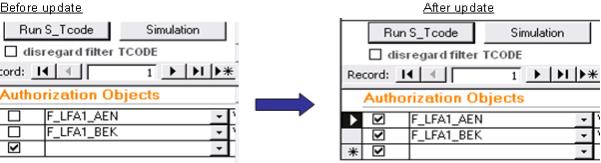
As shown in the comparison above, no extra authorization objects are inserted into the 'Authorization Objects'- and 'Authorization Object Field Values'-panes, although the 'Optional Authorization Object'-entry 'Are business areas being used?' includes authorization objects other than F_DES_GSB and F_FDSR_GSB. Indeed, there has only been an 'activate-action' performed after selecting 'Are business areas being used?'.
Note: The questionnaire will appear each time you open the Select & Run, Audit Cockpit or Process Audit functionality as long as you have not manually applied the questionnaire's settings, or checked the 'Questionnaire has been completed and applied to all queries' Field at the top right corner of the questionnaire.
 Questionnaire